
NovelMaster
SUNGAI PTE.LTDBooks & Reference
2.7782.00 Reviews
- Version
- 3.2.0
- Installs
- 500.00K
- Age Rating
- Teen
Screenshots

Our Review of NovelMaster
 Analysis by Appyee
I judge a reading app by more than the size of its catalogue: I want to know whether I can get to a story without fuss, whether the screen works for the way I read, and whether the app fits the small gaps in an ordinary day. NovelMaster is a free Books & Reference app from SUNGAI PTE.LTD, built around short fiction and a straightforward interface. That focus can suit readers who want a quick chapter-sized escape, though the experience is not equally comfortable for everyone.
Getting Started with NovelMaster
So, let’s dive right in. First things first, the app is free to download, and its current version is 2.27.3.0. It runs on Android 6.0 or later and is rated for Teen readers. Once downloaded, you’re greeted with a clean and friendly interface that’s super easy to navigate. No need to fumble around trying to find what you’re looking for.
The app has drawn over 500,000 installs, but its average rating is 2.2 from around 3,600 ratings, so I would approach it with measured expectations rather than assuming every part will feel polished. Its in-app purchases range from $0.99 to $269.99 per item, a wide enough span that I’d check the cost shown in the app before buying anything. The sensible starting point is to browse first and decide whether the reading experience suits you before spending.
On a practical level, a simple interface can reduce the number of decisions between opening an app and finding something to read. That matters if you are using a phone one-handed while waiting in line, or if you find dense menus tiring. I would still take a minute to explore the available controls before settling in: knowing where the library and reading options are can prevent repeated searching later.
Upon opening the app, you’re prompted to create an account. Don’t worry, it’s a quick process. Once you’re in, you can start exploring the short stories. For an everyday test, I’d pick a story while connected at home, read a little, and see whether the pacing and presentation work for a spare ten minutes before making it part of a routine.
Finding a story without losing your place
Short fiction is especially useful when a full-length book feels like too large a commitment. I can imagine opening the app during a lunch break, choosing one story, and closing it when the break ends rather than trying to remember where I was in a long novel. That makes it a better fit for brief reading windows than for someone seeking a carefully curated, long-form literary catalogue.
As you browse, keep your own shortlist rather than relying entirely on what appears first. A story that catches your eye may be a better match for your mood than a popular pick, and building a small queue helps when you only have a few minutes to decide. This is a useful habit in any story app, but it matters here because quick access is part of the appeal: too much browsing can consume the very break you meant to fill.
I’d also treat the Teen content rating as a useful cue for families, not a substitute for checking whether a particular story suits a younger reader. Reading tastes and sensitivities vary, so if a teen is using the app, it makes sense for them or a parent to preview a story before settling on it. The rating gives a broad age signal; personal judgement still matters.
Readability, navigation, and different needs
The simple layout is a good starting point for readers who prefer a direct route into a story, but ease of navigation is personal. Someone comfortable with small touch targets may move around quickly; someone with limited dexterity may need more time and steadier taps. I’d test the controls in a calm moment rather than during a crowded commute, when accidental taps are more likely and patience is limited.
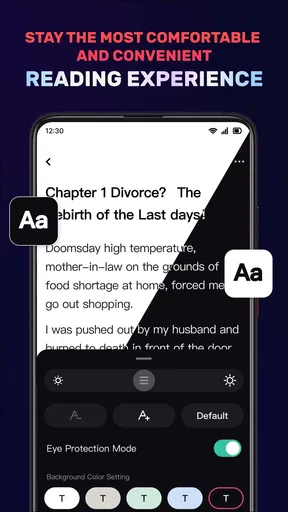
Reading on a phone can also be tiring for people who are sensitive to glare, small text, or long stretches of close-up focus. If the reading screen offers controls that help you settle on a comfortable presentation, adjust them before starting rather than interrupting a story repeatedly. I would not assume a particular setting is available unless I can see it in the app; the practical test is whether the text remains comfortable for your eyes on your own device.
For readers who use assistive technology, the important question is not simply whether an app has a clean design, but whether the controls and text work with their usual setup. I’d check basic navigation and reading with the device settings or tools I rely on before investing time in a large queue. A straightforward screen may help, but it does not by itself guarantee an accessible experience for every ability.
When short stories fit the day
Think of a delayed appointment: you have a few minutes, the room is noisy, and you do not want to carry a paperback or commit to a long chapter. A short story app can make that pause feel less wasted. If you know you’ll be somewhere with unreliable reception, prepare while connected and confirm that the story you want is available to read before you leave; that small check is more dependable than discovering a connection problem halfway through a wait.
Compared with a general ebook reader, a short-story-focused app is appealing when you want quick discovery and compact reading sessions. A conventional ebook service or a library app may be a better choice if you want to bring together books from different sources, borrow longer works, or keep a reading collection independent of one app. NovelMaster’s appeal is narrower: it makes sense when short fiction itself is what you want, not as a complete replacement for every way you read.
Costs, expectations, and the choice to continue
Because the app is free to download but includes in-app purchases, I’d separate “trying it” from “paying for more.” Read the purchase screen carefully and consider whether the amount matches how often you expect to use the app. With a broad price range, a casual reader should be especially cautious about tapping through a purchase without checking its terms and total cost.
The relatively low average rating is another reason I would test the basics early: can you find a story you actually want, is the text comfortable on your phone, and does the app behave well enough for your routine? Those are more useful personal checks than popularity alone. If any of them fails, you lose little by returning to an ebook reader, a library service, or another source of short fiction that better fits your habits.
Who I’d recommend it to
I’d suggest giving it a try if you enjoy bite-sized fiction, mostly read on your phone, and like having something ready for brief pauses. It may also suit a reader who wants to explore stories without first committing to a full-length book. For someone who reads for hours at a time, needs carefully verified accessibility support, or wants a dependable home for a mixed collection of books, I’d compare other options before settling in.
My practical approach would be to start with one story, test the reading screen in the lighting and setting where you usually read, and check any purchase details before paying. If the app feels easy to return to and the short format fits your day, it could earn a modest place in your reading routine. If navigation, text comfort, or costs create friction, there are better ways to spend your reading time.
Have you ever been stuck in a never-ending commute or a long wait at the doctor’s office with nothing but time on your hands? Well, I’ve got a little gem for you: NovelMaster. This app is like having a magical library in your pocket, ready to whisk you away into different worlds whenever you need a break from reality.
Discovering Your Next Favorite Read
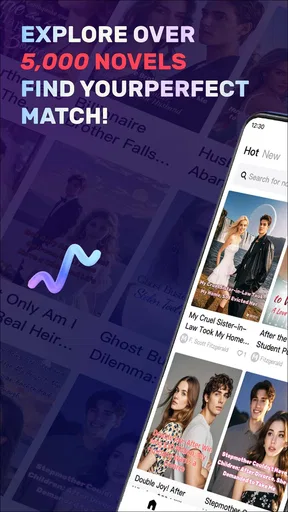
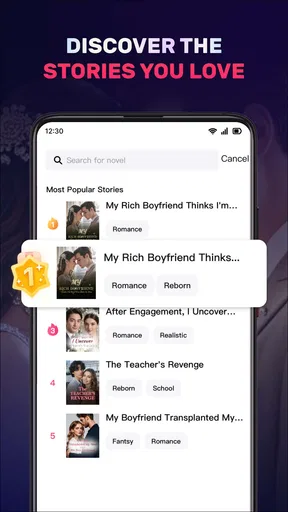
Now, let’s talk about the real magic of NovelMaster: its discovery engine. The app uses a smart algorithm to suggest books based on your reading history and preferences. It’s like having a personal librarian who knows exactly what you’re in the mood for. You can even filter by genre, author, or popularity if you’re feeling picky.
One of my favorite features is the “Trending Now” section. It’s a fantastic way to keep up with what others are reading and join in on the latest bookish buzz. Plus, you can follow authors to keep tabs on their new releases. It’s like being part of an exclusive book club!
Reading Experience and Features
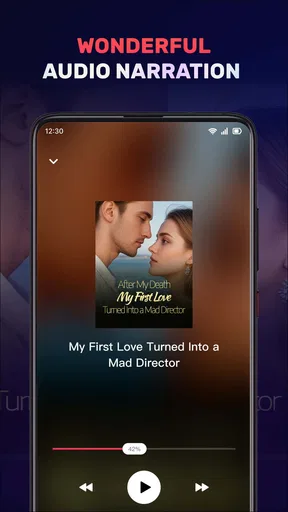
Once you’ve picked a novel, the reading experience is top-notch. The app supports multiple reading modes, including day and night themes, font size adjustments, and even a text-to-speech option for those times when you’d rather listen than read. Personally, I love switching to night mode and diving into a good mystery before bed.
Highlighting and note-taking features are also available, making it easy to jot down thoughts or favorite quotes. And if you’re the type who likes to discuss and dissect plots with fellow readers, the app’s community feature lets you connect and chat with others about your latest read.
Offline Access and Customization
What’s truly a lifesaver is the ability to download novels for offline reading. Whether you’re on a flight or stuck in a no-signal zone, you can still enjoy your book without any interruptions. Just download your favorites when you’re connected, and you’re good to go.
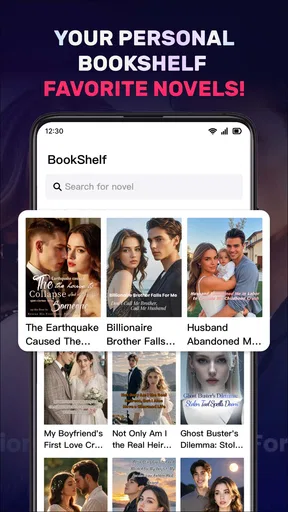
Customization doesn’t stop at the reading experience. You can organize your library to your heart’s content, creating personalized shelves and lists. Whether it’s “To Read,” “Favorites,” or “Currently Reading,” managing your book collection is a breeze.
Subscription and Pricing
While NovelMaster offers a decent selection of free books, a premium subscription unlocks the full library and additional perks. The pricing is pretty reasonable, considering the vast array of content you get access to. There’s even a free trial if you want to test the waters before diving in.
For avid readers, the subscription is totally worth it. You get unlimited access to new releases and an ad-free experience, which, let’s be honest, makes a world of difference when you’re lost in a good book.
Final Thoughts
All in all, NovelMaster is a fantastic app for anyone who loves to read. Its user-friendly interface, personalized recommendations, and extensive library make it a must-have for book lovers. Whether you’re a casual reader or a literary enthusiast, this app will keep you hooked and coming back for more.
So, next time you find yourself with a bit of downtime, why not escape into the pages of a new adventure with NovelMaster? Happy reading!
Verdict
Strengths of NovelMaster
- Extensive library with diverse genres.
- User-friendly interface and navigation.
- Offline reading mode available.
- Customizable reading settings.
- Regular updates with new titles.
Limitations of NovelMaster
- Limited free content access.
- Frequent ads in the free version.
- Requires stable internet for streaming.
- Some titles lack audio support.
- Subscription can be pricey.
Similar Picks in This Category
View All
Google Play Books & Audiobooks
Google LLC4.7

네이버 - NAVER
NAVER Corp.3.5

Wattpad - Read & Write Stories
Wattpad.com3.7

King James Bible - Verse+Audio
Ozion4.8

Bible Offline-KJV Holy Bible
Bíblia Offline4.9

Amazon Kindle: Reading App
Amazon Mobile LLC4.8
Frequently Asked Questions
What is NovelMaster and what does it offer?
NovelMaster is an innovative app designed for avid readers and writers. It provides a comprehensive platform for discovering, reading, and writing novels across various genres. Users can engage with a vast library of stories, follow their favorite authors, and even publish their own works to share with a community of literature enthusiasts.
Is NovelMaster available for both Android and iOS devices?
Yes, NovelMaster is available for download on both Android and iOS platforms. This ensures that users can access the app regardless of their device preference, providing seamless integration and synchronization across different devices to enhance the reading and writing experience.
Does NovelMaster offer any offline reading features?
Absolutely! NovelMaster allows users to download their favorite novels for offline reading. This feature is particularly useful for those who want to enjoy uninterrupted reading without the need for a continuous internet connection, making it convenient for travel or areas with limited connectivity.
Are there any subscription or in-app purchase options in NovelMaster?
NovelMaster offers both free and premium content. While many stories are available for free, the app also provides a subscription model for accessing exclusive content and additional features. In-app purchases may include subscriptions or individual story unlocks, offering flexibility based on user preferences.
How does NovelMaster handle user privacy and data security?
User privacy and data security are top priorities for NovelMaster. The app employs robust encryption and secure servers to protect user data. It adheres to strict privacy policies and guidelines, ensuring that personal information is never shared without consent, providing users peace of mind while enjoying the app.
